Track timing
Give each track of a pattern its own speed and groove. For example: hats at 2x over a kick at 1x, a bass at 1/2x that takes two loops of the pattern to play its 16 steps, drums on Swing 58 while the keys stay Straight.
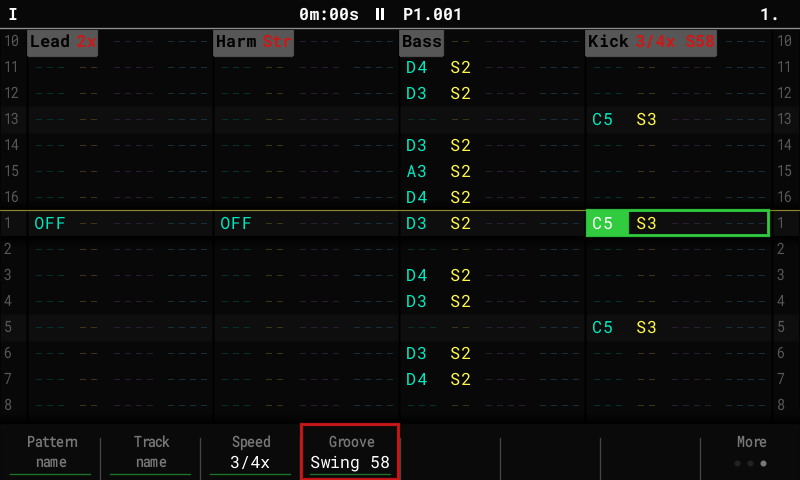
Setting it
On the Pattern screen, press More (F8) twice for the names page:
| Key | Does |
|---|---|
| Speed (F3) | Hold and turn the encoder (or Up / Down): 1/8x, 1/4x, 1/2x, 3/4x, 1x, 1.5x, 2x. |
| Groove (F4) | Hold and turn: Global, Straight, Swing 54, 58, 62, 66, 71, Shuffle, Laid back. |
- They set the cursor track of the current pattern. While holding F3 or F4, Left / Right moves to the next track, so you can set several in one go.
- A track off the defaults shows a tag in its header:
Hats 2x,Kick 3/4x S58,Keys Str. A pattern with every track at 1x / Global looks as on stock. - Undo takes a change back. Copying a pattern copies its timing.
Speed
- Speed changes when steps play, never how they sound: a sample keeps its pitch and length, so at 2x a long sample is cut by the next note on the track.
- Things counted in steps follow the track: Roll, Arp, Micro-move, Gate and the groove. Things counted in time don't: envelopes, LFOs, Timestretch.
- The pattern still ends after its length at 1x, and song mode moves on then. A track at another speed wraps on its own length: at 2x it loops twice per pattern, at 1/2x it plays half its steps per pattern and carries on from there the next time round. Switching to another pattern starts every track from step 1 again.
- MIDI clock out, the metronome and the playhead row follow the pattern at 1x.
Groove
- Global (default): the track swings with the Swing step FX, as on stock.
- Any other groove replaces the Swing FX for that track: Straight keeps it even while the rest swings; Swing 54–71 delays every second step by that much (MPC style: 54 is a light lilt, 66 close to triplets); Shuffle swings 8th notes; Laid back plays beats 2 and 4 a little late.
- A groove moves notes by where they sit in the bar, so notes you add later get it too. Micro-move still nudges a single note on top.
Compatibility
The settings are saved in timing.bin next to project.mt, only while a pattern uses
them. Stock firmware and the Tracker Mini ignore the file and play every track at 1x with
the Swing FX.