Remote control
A Tracker running OpenTracker can be connected to a computer over USB and driven from it: as the simulator's front panel, by test scripts, or mirrored live on screen.
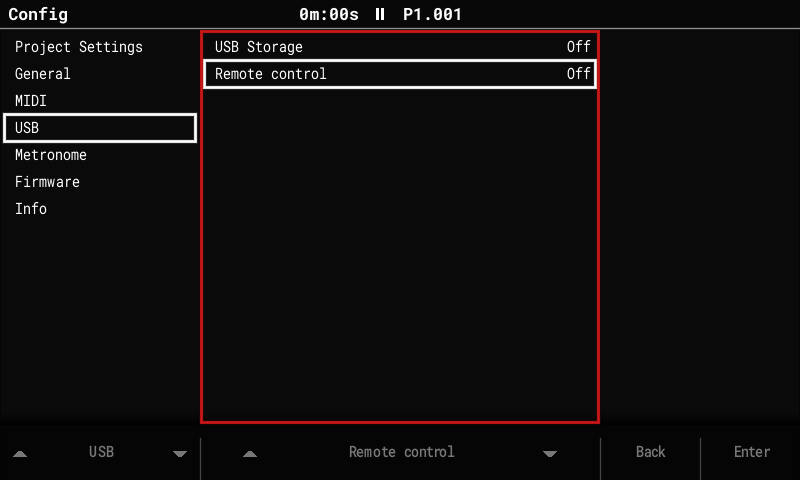
Turn it on
- Connect the Tracker by USB.
- Config > USB > Remote control: On. It's Off again after every power-on.
- On Linux the Tracker appears as a serial port, usually
/dev/ttyACM0. If it can't be opened, add your user to the group that owns it (uucpon Arch,dialouton Debian/Ubuntu).
One program at a time
The link shares the USB serial port with the diag log. Close serial terminals, loggers or anything else that holds the port open first.
A short press of the power switch ends remote control (holding it still powers off).
Three ways to use it
Drive mode: scripts
tools/tracker_remote.py presses buttons and pads, turns the encoder, reads the
Tracker's status (screen, transport, output level, CPU, the current notice), the text on
screen, and takes screenshots. The Tracker's own controls keep working.
tools/tracker_remote.py /dev/ttyACM0 -c "tap PERFORMANCE; wait 300; expect-screen Performance; text; screenshot perf.png" \
    --out shots --log tracker.log
- Scripts use the simulator's script language plus
checks (
expect-text,expect-sound,wait-for slot == 2…). Ready-made ones are intools/remote_scripts/; the same files run on the simulator in CI. --logkeeps everything the Tracker sends, including its telemetry lines. Check them withtools/telemetry_check.py log tracker.log.
Edit mode
In the Pattern screen's edit mode, the encoder and pads change the pattern. Turn edit mode off before running scripts that use them there.
Live mirror
The simulator shows the Tracker's screen live and sends its window's keys and mouse to the Tracker:
build/sim/opentracker-sim --mirror /dev/ttyACM0
The Tracker sends each frame it draws (about 12 per second while playing).
Panel mode
The Tracker becomes the simulator's front panel: its buttons, pads and encoder drive the simulator, and the simulator lights its pads.
build/sim/opentracker-sim --remote /dev/ttyACM0
The Tracker shows "Remote control: panel drives the simulator" and stops reacting to its own controls until the simulator quits or the cable is unplugged (it recovers within 2 s).