MIDI instrument LFO
Each MIDI instrument (MIDI 1–16) gets one tempo-locked LFO, sent alongside its notes.
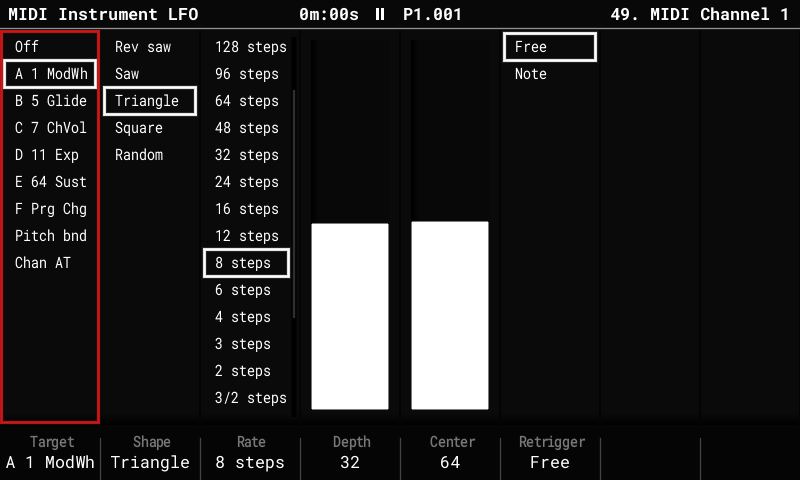
Set it up
- Select a MIDI instrument: hold Instrument and turn the encoder.
- Press Instrument Params, then Instrument Params again: the key steps through the MIDI parameters page, the MIDI Instrument LFO page and the MIDI Instrument Preset page.
| Setting (key) | Choices |
|---|---|
| Target (F1) | Off, one of the CC slots A–F, pitch bend or channel pressure; the whole list is on screen, slots shown by their CC's name ("A Cutoff"). The LFO follows the slot: change the slot's CC on the parameters page and the LFO moves with it. A slot set to Prg Chg or Poly AT sends nothing. Turning the encoder only picks the target; the LFO moves to it once the encoder rests, so the slots passed on the way are left alone. |
| Shape (F2) | Rev saw, Saw, Triangle, Square, Random. |
| Rate (F3) | From 128 steps per cycle down to 1/8 step, locked to the tempo. |
| Depth (F4) | How far it swings either side of Center, 0–64: Center 64 and Depth 32 sweep 32–96; Depth 64 sweeps the whole range. |
| Center (F5) | The value it swings around (0–127): value = Center + Depth × wave, kept within 0–127. On pitch bend, -64..63 around no bend, in the same steps as Depth. |
| Retrigger (F6) | Free (follows the song position) or Note (restarts with each note). |
Good to know
- LFO messages use at most half of a DIN MIDI port's bandwidth, so notes are never delayed by them.
- The LFO runs while the sequencer plays. At Stop, its target is left at Center, and so is a target you switch away from (or turn Off) while playing.
- A step FX on the same target (the LFO's CC slot, pitch bend, or pressure) moves the LFO's Center, so the pattern can shift the wobble around.
- Stored in
midi_lfo.binnext toproject.mt; other firmware ignores it.