Song mode
The Song screen arranges patterns into a list of slots. The fork adds repeat counts, a Performance scene per slot, and fader ramps between two scenes, so a song can be arranged with performance changes without copying patterns.
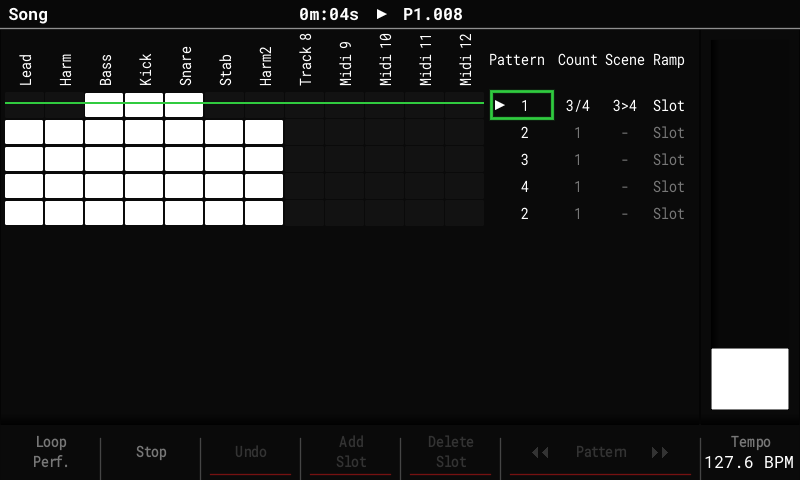
The Song list has four columns: Pattern, Count, Scene and Ramp. In edit mode (Rec), Right moves from the list into the columns, Left back. Delete resets the selected value.
Repeat counts
- Count plays the slot's pattern 1 to 16 times before the song moves on, so a section no longer needs duplicate slots. Set it with the encoder.
- While playing, the playing slot shows its pass, for example
3/4. - Add Slot copies the count. Loop Pattern / Continue Song work as before (Continue leaves the slot at the end of the current pass).
Scenes per slot
- Scene puts a scene from the scene bank on the
crossfader's A end as the slot starts, with the fader at A. The encoder picks the
scene, or
-for none. - Shift + encoder adds a second scene for B (shown as
3>4). - A slot's scene plays on any screen, not only on the Performance screen, until Stop or the next slot.
- A
-slot (no scene): on the Performance screen what plays stays; on other screens the song's scene ends (FX off). To hold a scene across slots, set it on each slot.
Ramps
A slot with a scene on B sweeps the fader from A to B. Ramp sets when:
| Ramp | The fader goes A → B … |
|---|---|
Slot |
across all the slot's passes |
Each |
across each pass, back to A as the next one starts |
First |
across the first pass, then stays on B |
Last, L2 … L15 |
across the last N passes (the choices follow the slot's Count) |
1 … 128 |
across the slot's last N steps (Shift + encoder moves by 16) |
Moving the fader yourself takes over until the next slot.
Moving around
- Song + Right jumps from the track grid straight to the Pattern list; Song + Left goes back into the grid (edit mode). Shift + Left / Right still sizes the grid selection.
Saved with the project
Counts, scenes and ramps are stored in song.bin next to project.mt. Stock firmware
plays every slot once, without scenes.
Exporting
File > Export > Song and Song Stems render the slots' scenes and ramps the way playback does. F7 Perf FX on the Export page turns this On / Off (On after every power-on); Off gives the stock export without Performance FX.
- Stems get each track's Performance FX. The master FX (DJ filter, tape stop) act on the whole mix, so only the full-mix export (Song) has them.
- Only what the song stores is rendered: where the fader or the pads were when you pressed Export doesn't matter, so the same song always exports the same way.
- Pattern exports play no song slots, so they render without scenes.